Castle Vector Illustration Bundle Set: A Practical Guide for Creators
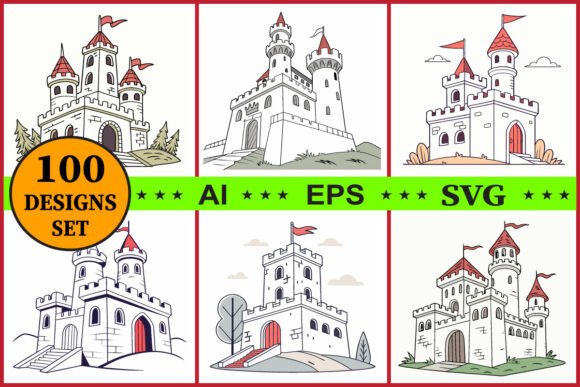
Stepping into a world of fantasy requires more than just imagination; it demands the right tools to bring those visions to life. For designers, educators, and crafters alike, the Castle Vector Illustration Bundle Set offers a treasure trove of 100 unique castle designs, ranging from medieval fortresses to whimsical fairy tale towers. Whether you are crafting invitations, designing t-shirts, or creating classroom decor, having access to high-quality, scalable graphics is essential. However, simply downloading a large bundle does not guarantee success. Many creators overlook critical details regarding file formats, editing capabilities, and intended use cases, which can lead to wasted time and subpar results.
Understanding What You Are Actually Buying
Before diving into your next project, it is vital to understand exactly what the Castle Vector Illustration Bundle Set provides. This collection includes 100 files each in AI, EPS, and SVG formats. These are not static images like JPEGs or PNGs that lose quality when enlarged. Instead, they are vector illustrations defined by mathematical paths, making them fully editable and infinitely scalable. This distinction is crucial for anyone planning to use these assets for print-on-demand (POD), sublimation, or large-format posters.
A common misunderstanding among beginners is assuming that "vector" automatically means "perfect for every situation." While vectors are powerful, the specific style matters. This bundle features hand-drawn, whimsical styles ideal for children's books, scrapbooking, and fairytale projects. If you are looking for photorealistic architectural blueprints or gritty, dark medieval textures, this particular set may not align with your vision. Evaluating the aesthetic before purchasing ensures that the assets fit your brand or project narrative without requiring excessive rework.
Pitfalls in File Format Selection
One of the most frequent mistakes creators make is ignoring the nuances of different file formats within the bundle. The inclusion of AI, EPS, and SVG files is a strength, but only if you know how to utilize them correctly. Using the wrong format for your software can result in compatibility issues or lost editability.
- AI Files: These are native to Adobe Illustrator. They offer the highest level of editability, allowing you to rearrange layers, change colors, and modify shapes. If you are a professional designer using Adobe Creative Cloud, this should be your primary choice.
- EPS Files: Often used as a universal vector format, EPS is compatible with many older design programs and some printing workflows. It is reliable but can sometimes have compatibility quirks depending on the software version.
- SVG Files: Perfect for web elements, Cricut, and Silhouette projects. SVGs are lightweight and maintain quality on screens and cutting machines. However, they are less ideal for complex print layouts compared to AI or EPS.
If you attempt to open an AI file in a program that doesn't support it natively, you might find yourself unable to edit individual elements. Conversely, using a rasterized version of these castles for a large banner will result in pixelation. Always match the file format to your specific workflow to ensure efficiency and quality.
The Hidden Cost of Color Management
Another overlooked detail is color variance. The product description notes that "colors may vary depending on devices and printers." This is a standard disclaimer in digital art, yet it often catches creators off guard. What looks vibrant on your calibrated monitor might appear dull or shifted when printed on paper or sublimated onto fabric.
To avoid disappointment, do not rely solely on the screen preview. Before committing to a full production run—especially for commercial use or POD items—print a small test sample. Check the saturation and contrast. Since the Castle Vector Illustration Bundle Set is fully editable, you have the power to adjust hues and tones to match your specific printing environment. Ignoring this step can lead to a batch of products that do not meet your quality standards, resulting in wasted materials and customer dissatisfaction.
Maximizing Commercial Potential
For entrepreneurs and small business owners, the ability to use these assets for commercial purposes is a key selling point. However, "commercial use" does not mean you can sell the raw files themselves. It typically means you can incorporate the designs into finished products like stickers, posters, or clothing. Misinterpreting the license terms can lead to legal complications or account suspensions on marketplaces like Etsy or Amazon.
A better approach is to treat these castles as foundational elements rather than final products. Use the "rearrange into more designs" feature mentioned in the bundle description. Combine a tower from one illustration with a gate from another to create a unique scene. This adds value and originality to your work, distinguishing your brand from others who might be using the same base assets. By customizing the designs, you protect your intellectual property and create a more cohesive visual identity.
Practical Steps for Successful Implementation
To get the most out of the Castle Vector Illustration Bundle Set, follow these practical steps before starting your creative process:
- Verify Software Compatibility: Ensure your vector editing software (Adobe Illustrator, CorelDRAW, Inkscape, etc.) supports the included formats. Test opening one file first to confirm all layers are intact.
- Organize Your Assets: With 300 total files (100 in three formats), organization is key. Create a clear folder structure immediately after download to prevent losing specific designs later.
- Test Print Early: Run a test print on the actual material you plan to use (paper, vinyl, fabric) to check color accuracy and cut lines if using a Cricut or Silhouette.
- Customize Aggressively: Don't just place the image as-is. Change line weights, swap palettes, and combine elements to create something uniquely yours.
By approaching this bundle with a strategic mindset, you transform a simple digital download into a versatile resource that elevates your projects. Whether you are an educator decorating a classroom or a freelancer building a portfolio, understanding the strengths and limitations of these vector illustrations ensures you deliver professional, enchanting results every time. Download instantly, verify your setup, and start creating with confidence.